ODBC-ODBC Bridge
ODBC Bridge for Linux, UNIX, and Windows
The Easysoft ODBC-ODBC Bridge is a client/server product that allows an ODBC application to access an ODBC driver on a remote machine.
The ODBC-ODBC Bridge client is an ODBC driver that communicates with the ODBC-ODBC Bridge server. The ODBC-ODBC Bridge server connects to an existing ODBC driver on the server machine. It does not need to be installed on the database server.
The ODBC-ODBC Bridge is normally used to provide access to an ODBC driver you cannot obtain for the client platform. For example, your ODBC application needs to run on Linux but it needs to use a Microsoft ODBC driver only available on Windows.
Our customers are typically using the ODBC-ODBC Bridge with applications and interfaces such as Perl, Apache, PHP, Python, and C to access Windows ODBC drivers from UNIX and Linux. These ODBC drivers include:
- Microsoft SQL Server
- Microsoft Access
- Microsoft Dynamics
To help you administer and control remote ODBC access, the ODBC-ODBC Bridge server also offers features such as centralised configuration, management, access control, and monitoring.
Features
Client
The ODBC-ODBC Bridge client is a fully ODBC 3.5 compliant ODBC driver.
The ODBC-ODBC Bridge client provides access to remote ODBC drivers installed on machines other than the one where your ODBC application is running.
In addition, the ODBC-ODBC Bridge client:
- Leads you through the process of creating your first data source.
- Includes oobping, a program that lets you check that an ODBC-ODBC Bridge server is alive, test authentication, and test the connection to remote data sources.
- Works seamlessly with ODBC interfaces such as Perl DBD::ODBC, PHP, Rexx/SQL, Python mxODBC, and Python pyodbc.
- Has been tested with a large range of ODBC applications. Supported applications include OpenOffice.org, ApplixWare, StarOffice, Microsoft Access, and Microsoft Excel.
- Contains ODBC optimisations for fetching rows when not using bound columns.
- Compresses network data for maximum throughput.
- Has comprehensive tracing facilities.
- Contains a demonstration ODBC application (with source) that connects to an ODBC data source.
- Includes the unixODBC Driver Manager on Linux and UNIX platforms.
- Supports fallback ODBC-ODBC Bridge servers to increase service availability. If the primary server is unable to service a request, fallback servers can be swapped in and out automatically without interruption of service.
Server
The ODBC-ODBC Bridge server receives ODBC API calls from the ODBC-ODBC Bridge client and directs them to the requested ODBC driver.
In addition, the ODBC-ODBC Bridge server:
- Contains an HTTP administration server that lets you configure, monitor, and control the ODBC-ODBC Bridge server.
- Uses native operating system authentication to protect access to your data sources and the ODBC-ODBC Bridge HTTP administration server.
- Lets you secure data transmitted across the network from the ODBC-ODBC Bridge client by using an encrypted connection. This protects your private data from attackers who try to capture unencrypted data by using a packet sniffer.
- Supports access control rules that let you restrict access to the ODBC-ODBC Bridge server by user, machine, or network address.
- Protects thread-unsafe ODBC drivers when accessed from a multi-threaded application.
- Provides statistics on uptime, CPU usage, total connections, total successful connections, active connections, and peak concurrent connections.
- Audits connection activity to a file. Generates audit log (and native Windows event log) entries for connection attempts denied due to invalid authentication details, a connection limit, or an access control rule.
- Displays a list of configured system data sources in the HTTP administration server. The system data sources are therefore visible in any Web browser.
- Limits the total number of concurrent connections or connections from a particular client, if you require this. Also logs all clients that have connected.
- Supports access control lists that let you restrict access to data sources by user, machine, or network address.
- Restricts remote access to the HTTP administration server by user, machine, or network address, if required. Remote access can also be turned off entirely.
- Allows individual HTTP administration server pages to be password protected or turned off. For example, the pages that let you change ODBC-ODBC Bridge configuration settings or browse data sources and their underlying databases.
- Allows these statistics to be exported to timestamped file: average connections per minute, connections per client.
- Rotates audit files automatically.
- Lets you view audit files in the HTTP administration server.
- Provides a graphical representation of connection history and auditable events helping you identify daytime trends and plan downtime.
- Provides data source statistics including connections per data source and average time per connection.
- Logs failing SQL. This helps you track down who or what is failing to query your database and the reason for the failure.
- Lets you export configuration details and licenses to create backup copies. You can reduce the time taken to administer servers by importing configuration details.
- Supports multiple network interface cards. The ODBC-ODBC Bridge server can either listen on one network interface or all network interfaces. The default behaviour is to listen on multiple networks.
- Provides a remote data source explorer allowing data sources, tables, columns, and rows to be viewed in your browser. Browsing remote data sources is useful when writing your client application on a different machine to the one on which the data sources have been added.
- Supports process affinity on Windows. This lets you define which CPUs are available to the ODBC-ODBC Bridge server process on Windows machines with multiple CPUs.
- Can enable connection pooling in the Driver Manager, reducing connection times for applications that repeatedly open and close ODBC connections.
The ODBC-ODBC Bridge server uses the database manufacturer's supplied ODBC driver so if the protocol is changed by the database manufacturer, ODBC-ODBC Bridge automatically supports these changes since database manufacturers always keep their ODBC driver synchronised with the database. This is not true of some other ODBC-ODBC Bridge competitors which use what they call wire protocol drivers; these drivers always have to be updated when the protocol changes to support new or changed features.
Standards conformance
ODBC-ODBC Bridge supports ODBC 1.0–3.5.
Although the ODBC-ODBC Bridge client is an ODBC driver, you can only use the ODBC functionality provided by the ODBC driver at the server end.
ODBC functions
The following ODBC functions are fully supported by the ODBC-ODBC Bridge, although support in the ODBC driver used behind the ODBC-ODBC Bridge server may differ. A call to SQLGetFunctions from the application will return the functions supported in the remote ODBC driver.
-
SQLAllocConnect -
SQLAllocEnv -
SQLAllocHandle -
SQLAllocHandleStd -
SQLAllocStmt -
SQLBindCol -
SQLBindParameter -
SQLBrowseConnect -
SQLBulkOperations -
SQLCancel -
SQLCloseCursor -
SQLColAttribute -
SQLColAttributes -
SQLColumnPrivileges -
SQLColumns -
SQLConnect -
SQLCopyDesc -
SQLDescribeCol -
SQLDescribeParam -
SQLDisconnect -
SQLDriverConnect -
SQLEndTran -
SQLError -
SQLExecDirect -
SQLExecute -
SQLExtendedFetch -
SQLFetch -
SQLFetchScroll -
SQLForeignKeys -
SQLFreeConnect -
SQLFreeEnv -
SQLFreeHandle -
SQLFreeStmt -
SQLGetConnectAttr -
SQLGetConnectOption -
SQLGetCursorName -
SQLGetData -
SQLGetDescField -
SQLGetDescRec -
SQLGetDiagField -
SQLGetDiagRec -
SQLGetEnvAttr -
SQLGetFunctions -
SQLGetInfo -
SQLGetStmtAttr -
SQLGetStmtOption -
SQLGetTypeInfo -
SQLMoreResults -
SQLNativeSql -
SQLNumParams -
SQLNumResultCols -
SQLParamData -
SQLParamOptions -
SQLPrepare -
SQLPrimaryKeys -
SQLProcedureColumns -
SQLProcedures -
SQLPutData -
SQLRowCount -
SQLSetConnectAttr -
SQLSetConnectOption -
SQLSetCursorName -
SQLSetDescField -
SQLSetDescRec -
SQLSetEnvAttr -
SQLSetPos -
SQLSetScrollOptions -
SQLSetStmtAttr -
SQLSpecialColumns -
SQLStatistics -
SQLTablePrivileges -
SQLTables
There are no ODBC functions partially supported or unsupported.
The following ODBC installer functions are provided by the ODBC-ODBC Bridge Setup library:
The following ODBC functions are provided by the Driver Manager:
ODBC data types
SQL_CHARSQL_WCHARSQL_VARCHARSQL_WVARCHARSQL_LONGVARCHARSQL_WLONGVARCHARSQL_NUMERICSQL_DECIMALSQL_SMALLINTSQL_INTEGERSQL_REALSQL_FLOATSQL_DOUBLESQL_BITSQL_TINYINTSQL_BIGINTSQL_BINARYSQL_VARBINARYSQL_LONGVARBINARYSQL_TYPE_DATESQL_TYPE_TIMESQL_TYPE_TIMESTAMPSQL_INTERVALS(all types)
Supported SQL
The ODBC-ODBC Bridge does not examine any SQL passed through ODBC calls. The SQL supported is that SQL supported by the remote ODBC driver behind the ODBC-ODBC Bridge server.
ODBC features
The ODBC-ODBC Bridge supports all ODBC features supported by the remote ODBC driver behind the ODBC-ODBC Bridge server with one exception:
Driver specific SQL_IS_POINTER attributes to SQLSetConnectAttr, SQLSetStmtAttr, and SQLSetDescField are not supported. To our knowledge, no current ODBC drivers have driver-specific pointer attributes.
The ODBC-ODBC Bridge provides transparent access to the remote ODBC driver with the following exceptions:
- Calls to
SQLGetInfoforSQL_DRIVER_NAME,SQL_DRIVER_ODBC_VER, andSQL_DRIVER_VERreturn ODBC-ODBC Bridge client specific values instead of values from the remote ODBC driver. This may be overridden with aGetInfoPassThruconnection string or data source attribute. - The results of most
SQLGetInfocalls are cached in the ODBC-ODBC Bridge client so that multiple calls for the same info value in the ODBC application are only seen once in the remote ODBC driver. - Any error generated by the ODBC-ODBC Bridge itself has "[Easysoft ODBC (client)]" or "[Easysoft ODBC (Server)]" appended to the ODBC diagnostic string. For example, if you attempt to access an ODBC-ODBC Bridge server from a client denied access in the ODBC-ODBC Bridge server's access control rules.
- Row-wise binding of columns is not duplicated in the remote ODBC driver by the ODBC-ODBC Bridge. Instead, any row bound columns are converted to column-bound columns in the remote ODBC driver and converted to row bound columns in the ODBC-ODBC Bridge client and the ODBC application. As far as the ODBC application is concerned, row-wise binding is occurring and this should not have any detrimental effects on the ODBC application other than possibly a very small increase in time due to conversion.
- If the connection or data source attribute
BlockFetchSizeis set to a non-zero value and the right conditions apply (refer to the ODBC-ODBC Bridge documentation), the ODBC-ODBC Bridge client will bind the columns itself as an optimisation. The remote ODBC driver will getSQLBindColandSQLFetchcalls instead ofSQLFetchandSQLGetDatacalls. - If the connection or data source attribute
MetaDataBlockFetchis turned on (it is by default), the optimisation above forBlockFetchSizeis done automatically for the metadata calls. (For example,SQLTables.) More information is available in the ODBC-ODBC Bridge documentation). - Some repeated calls to
SQLBindParameterby the ODBC application are not passed on to the remote ODBC driver. This is an optimisation that should have no effect on the ODBC application.
Thread safety
- The Windows ODBC-ODBC Bridge client is thread-safe. This means it is safe to use behind multi-threaded applications (as all ODBC 3.0 drivers are supposed to be).
- The non-Windows ODBC-ODBC Bridge client is available with a thread-safe driver (
ODBC-ODBC Bridge_r) version and a non-thread-safe driver (ODBC-ODBC Bridge) version, because:- Not all versions of UNIX operating systems have a thread library (for example, Posix, GNU Threads) or thread-safe runtime C library.
- On some UNIX operating systems, mixing libraries built with threads and libraries not built with threads does not work.
Multi-threaded application
- The Windows ODBC-ODBC Bridge server is a multi-threaded application, which may run in either multi-threaded or
MultiProcessmode.The default mode is multi-threaded, which means that the ODBC-ODBC Bridge server creates a new thread to handle each connection from an ODBC-ODBC Bridge client, whereas in
MultiProcessmode, the ODBC-ODBC Bridge server creates a new process for each connection from an ODBC-ODBC Bridge client.If the ODBC driver you are using is not thread-safe (for example, Microsoft Access Jet versions prior to 4.0), the ODBC-ODBC Bridge server should be run in
MultiProcessmode. - Because the ODBC-ODBC Bridge server is a multi-threaded application, it can take full advantage of the performance benefits available from systems with multiple processors.
- The non-Windows ODBC-ODBC Bridge server is single-threaded application. Every time an ODBC-ODBC Bridge client connects to the ODBC-ODBC Bridge server port, inetd or xinetd starts a new ODBC-ODBC Bridge server process to handle the connection. There can only be one thread of execution in these circumstances.
If the ODBC-ODBC Bridge server is run standalone (without inetd or xinetd) then the same principal applies, only this time the ODBC-ODBC Bridge server starts a new process to handle each connection.
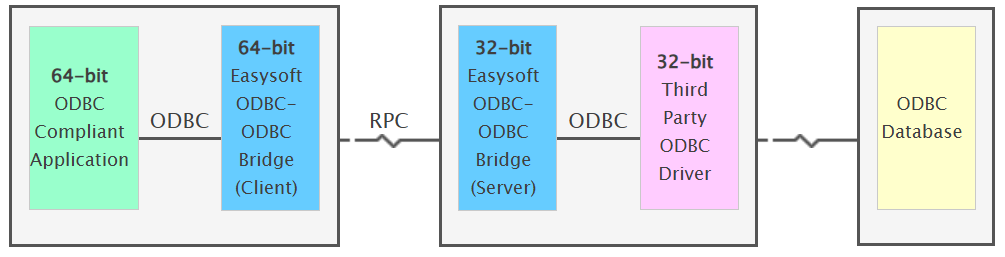
Connect a 64-bit ODBC application to a 32-bit ODBC driver. For example, connect a 64-bit Windows application to a 32-bit Microsoft Access Driver (*.mdb).
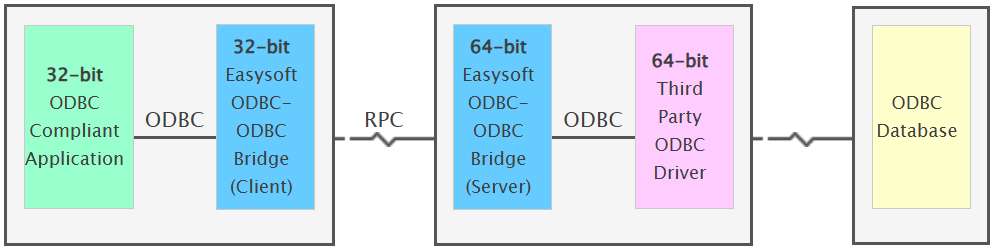
Connect an ODBC application to a remote ODBC data source. For example, connect a Linux application to a Windows ODBC data source.
The ODBC-ODBC Bridge server is currently available on these platforms:
| Version | Platform | Distribution |
|---|---|---|
| v2.6 (ODBC 3.5) | AIX (PPC) (32 - Bit) | (7.2, 7.3) |
| v2.6 (ODBC 3.5) | AIX (PPC) (64 - Bit) | (7.2, 7.3) |
| v2.6 (ODBC 3.5) | HP-UX (Itanium i64) (32 - Bit) | (11i) |
| v2.6 (ODBC 3.5) | HP-UX (Itanium i64) (64 - Bit) | (11i) |
| v2.6 (ODBC 3.5) | Linux (x86) (32 - Bit) | (kernel 2.2-5.0+, glibc 2.1+) |
| v2.6 (ODBC 3.5) | Linux (x86) (64 - Bit) | (kernel 2.6-5.0+, glibc 2.3.5+) |
| v2.6 (ODBC 3.5) | SCO Unixware (x86) (32 - Bit) | (7.0) |
| v2.6 (ODBC 3.5) | Solaris (Sparc) (32 - Bit) | (2.6-2.11) |
| v2.6 (ODBC 3.5) | Solaris (Sparc) (64 - Bit) | (2.8-2.11) |
| v2.6 (ODBC 3.5) | Solaris (x86) (32 - Bit) | (2.8) |
| v2.6 (ODBC 3.5) | Windows (x86) (32 - Bit, 64 - Bit) | (7, 8, 2012 R2, 10, 2016, 2019,11,2022, 2025) |
| v2.5 (ODBC 3.5) | Linux (ARMv71) (32 - Bit) | (Raspberry Pi, kernel 4.9.41-v7+, glibc 2.24+) |
| v2.3 (ODBC 3.5) | HP-UX (PA-Risc) (32 - Bit) | (10.10-11) |
| v2.3 (ODBC 3.5) | HP-UX (PA-Risc 2) (64 - Bit) | (11) |
| v2.3 (ODBC 3.5) | Linux (Itanium i64) (64 - Bit) | (kernel 2.4-2.6, glibc 2.2.5) |
| v2.3 (ODBC 3.5) | SCO Open Server (x86) (32 - Bit) | (5) |
| v2.3 (ODBC 3.5) | Solaris (x86) (64 - Bit) | (2.8) |
| v2.0 (ODBC 3.5 (32-Bit)) | FreeBSD (x86) (32 - Bit) | (5.4) |
| v2.0 (ODBC 3.5 (32-Bit)) | Irix (MIPS) (32 - Bit) | (6.5) |
| v2.0 (ODBC 3.5 (32-Bit)) | Irix (MIPS) (64 - Bit) | (6.5) |
| v2.0 (ODBC 3.5 (32-Bit)) | Sinix (MIPS) (32 - Bit) | (5.4.3) |
| v2.0 (ODBC 3.5 (32-Bit)) | Tru64 (Alpha) (64 - Bit) | (5.0) |
| v1.4 (ODBC 3.5 (32-Bit)) | Interix (x86) (32 - Bit) | (3.5) |
The ODBC-ODBC Bridge client is currently available on these platforms:
| Version | Platform | Distribution |
|---|---|---|
| v2.6 (ODBC 3.5) | AIX (PPC) (32 - Bit) | (7.2, 7.3) |
| v2.6 (ODBC 3.5) | AIX (PPC) (64 - Bit) | (7.2, 7.3) |
| v2.6 (ODBC 3.5) | HP-UX (Itanium i64) (32 - Bit) | (11i) |
| v2.6 (ODBC 3.5) | HP-UX (Itanium i64) (64 - Bit) | (11i) |
| v2.6 (ODBC 3.5) | Linux (x86) (32 - Bit) | (kernel 2.2-5.0+, glibc 2.1+) |
| v2.6 (ODBC 3.5) | Linux (x86) (64 - Bit) | (kernel 2.6-5.0+, glibc 2.3.5+) |
| v2.6 (ODBC 3.5) | SCO Unixware (x86) (32 - Bit) | (7.0) |
| v2.6 (ODBC 3.5) | Solaris (Sparc) (32 - Bit) | (2.6-2.11) |
| v2.6 (ODBC 3.5) | Solaris (Sparc) (64 - Bit) | (2.8-2.11) |
| v2.6 (ODBC 3.5) | Solaris (x86) (32 - Bit) | (2.8) |
| v2.6 (ODBC 3.5) | Windows (x86) (32 - Bit, 64 - Bit) | (7, 8, 2012 R2, 10, 2016, 2019,11,2022, 2025) |
| v2.5 (ODBC 3.5) | Linux (ARMv71) (32 - Bit) | (Raspberry Pi, kernel 4.9.41-v7+, glibc 2.24+) |
| v2.3 (ODBC 3.5) | HP-UX (PA-Risc) (32 - Bit) | (10.10-11) |
| v2.3 (ODBC 3.5) | HP-UX (PA-Risc 2) (64 - Bit) | (11) |
| v2.3 (ODBC 3.5) | Linux (Itanium i64) (64 - Bit) | (kernel 2.4-2.6, glibc 2.2.5) |
| v2.3 (ODBC 3.5) | SCO Open Server (x86) (32 - Bit) | (5) |
| v2.3 (ODBC 3.5) | Solaris (x86) (64 - Bit) | (2.8) |
| v2.0 (ODBC 3.5 (32-Bit)) | FreeBSD (x86) (32 - Bit) | (5.4) |
| v2.0 (ODBC 3.5 (32-Bit)) | Irix (MIPS) (32 - Bit) | (6.5) |
| v2.0 (ODBC 3.5 (32-Bit)) | Irix (MIPS) (64 - Bit) | (6.5) |
| v2.0 (ODBC 3.5 (32-Bit)) | Sinix (MIPS) (32 - Bit) | (5.4.3) |
| v2.0 (ODBC 3.5 (32-Bit)) | Tru64 (Alpha) (64 - Bit) | (5.0) |
| v1.4 (ODBC 3.5 (32-Bit)) | Interix (x86) (32 - Bit) | (3.5) |